Termshark: The Terminal UI That Brings Wireshark to Your Console
Termshark: The Terminal UI That Brings Wireshark to Your Console
Introduction
When I was working on a production server with limited resources, I often found myself needing to dig into network traffic without pulling massive pcap files back to my laptop. The classic Wireshark GUI was out of the question, and even using tshark from the command line felt clunky for interactive analysis. That’s where Termshark comes in—a lightweight, terminal‑based UI built on top of tshark that lets me search, filter, and follow flows right where the traffic is happening.
Analysis / Motivation
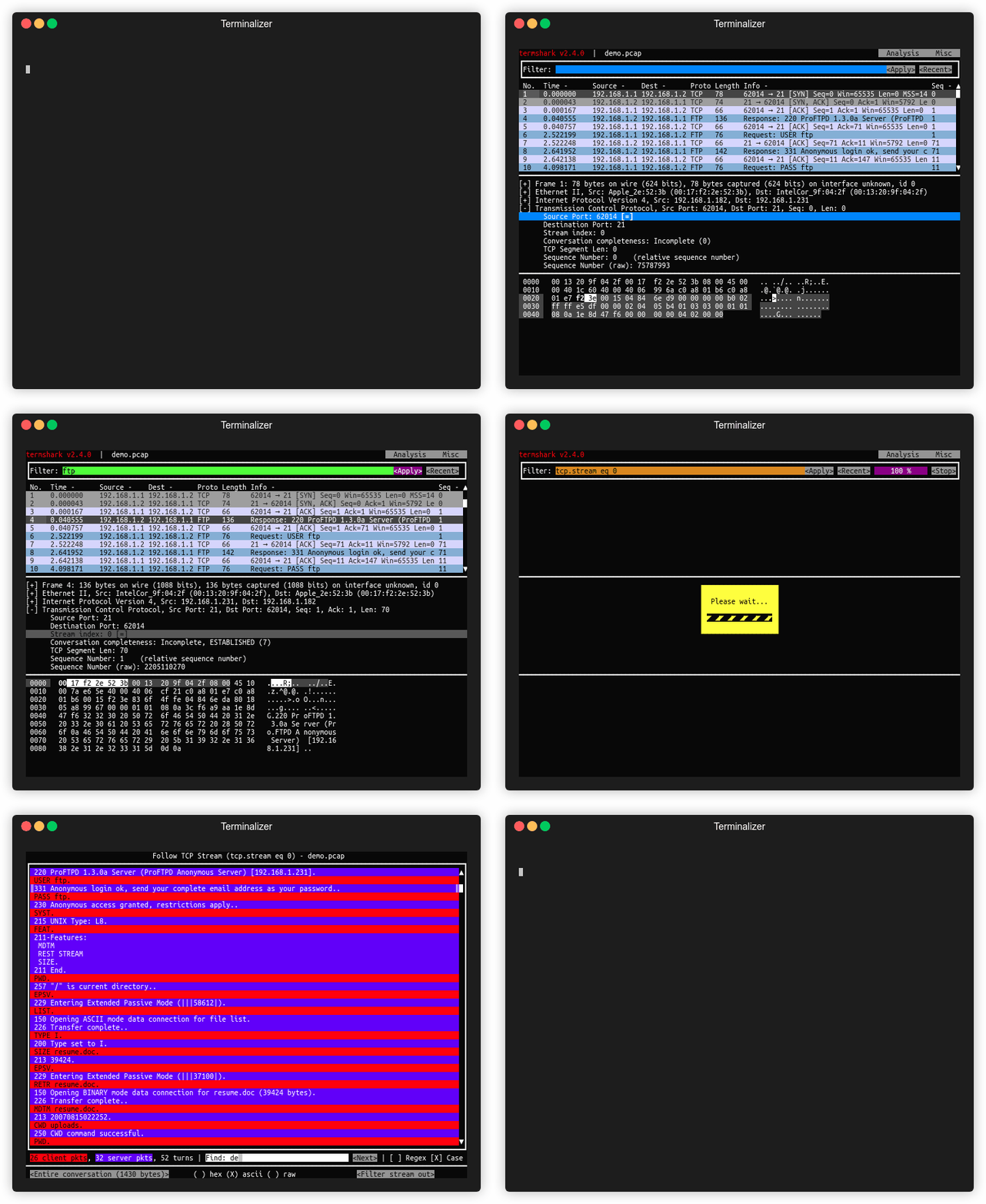
I’ve spent countless hours juggling tshark output and grep or awk pipelines to isolate the packets I care about. The learning curve for display filters is steep, and the lack of a visual interface makes it hard to keep context. Termshark addresses these pain points by providing:
- A clean, navigable UI that mirrors Wireshark’s packet list and details pane.
- Full support for Wireshark display filters.
- The ability to reassemble TCP/UDP streams and view conversations.
- Cross‑platform binaries that run on Linux, macOS, Windows, and even Android via Termux.
By keeping everything in the terminal, I can stay on the remote host, avoid unnecessary data transfer, and still get a rich packet‑analysis experience.
Key Features / Solution
- Read pcap files or sniff live interfaces –
termshark -r file.pcaportermshark -i eth0. - Filter using Wireshark’s display filters – just type
filter: icmpor any complex expression. - Reassemble and inspect TCP/UDP flows – jump straight into the conversation view.
- View network conversations by protocol – a quick way to see who talks to whom.
- Copy ranges of packets to the clipboard – handy for sharing or further analysis.
- Single executable built with Go – no dependencies beyond tshark (>= 1.10.2) and a few Go modules.
- Pre‑compiled binaries for major distros – Arch, Debian, FreeBSD, Homebrew, MacPorts, Kali, NixOS, Snap, Termux, and Windows.
- Extensible with profiles for colors and columns – the latest v2.4 adds search and customizable views.
Installation is straightforward: if you have Go installed, just run go install github.com/gcla/termshark/v2/cmd/termshark@v2.4.0 and ensure tshark is in your $PATH. For quick starts, termshark -r test.pcap or termshark -i eth0 icmp will get you up and running.
Conclusion
Termshark is a game‑changer for anyone who needs to analyze network traffic on a remote or headless machine. It brings the power of Wireshark’s display filters and flow reassembly to a terminal UI, all while staying lightweight and cross‑platform. If you’re still using raw tshark or scp’ing pcaps back and forth, give Termshark a try—your debugging workflow will thank you.
Source context: this post is based on the GitHub repository at https://github.com/gcla/termshark by Graham Clark.



Comentarios