
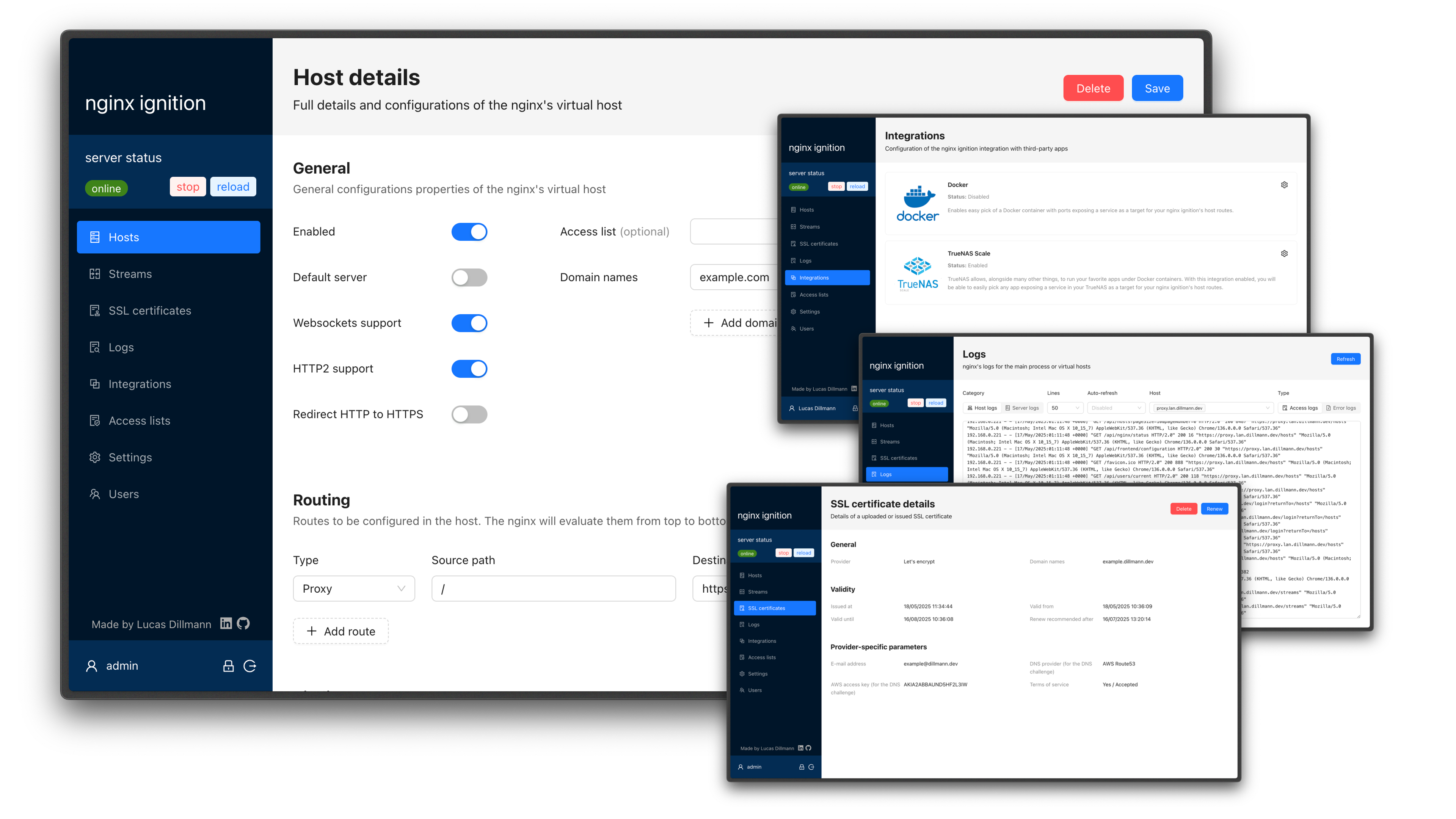
Simplify Nginx Management with the Nginx Ignition UI
Simplify Nginx Management with the Nginx Ignition UI
Introduction
When I first started working with Nginx, the sheer volume of configuration files and the need to remember every directive felt overwhelming. I was looking for a way to manage my reverse proxies, load balancers, and TLS settings without constantly editing nginx.conf by hand. That’s when I stumbled upon Nginx Ignition, a user interface that promises to make Nginx configuration intuitive and powerful.
Analysis / Motivation
From my perspective, the biggest pain points with Nginx are:
- Complexity – Even a simple site often requires custom error pages, upstreams, and SSL settings.
- Repetition – Managing multiple virtual hosts across environments leads to copy‑paste errors.
- Visibility – Keeping track of logs, health checks, and access controls manually is time‑consuming.
Nginx Ignition tackles these issues by offering a web‑based dashboard that abstracts the underlying configuration. Instead of editing .conf files, I can define hosts, streams, and security policies through a clean UI, then let the tool generate the necessary directives.
Key Features / Solution
Below are the standout capabilities I’ve found most useful:
- Multiple Virtual Hosts – Create isolated hosts with custom domains, routes, and port listeners.
- Stream Support – Proxy raw TCP, UDP, or Unix sockets with SNI‑based routing, circuit breakers, and weighted load balancing.
- Route Flexibility – Each route can act as a proxy, redirection, custom JavaScript/Lua execution, static response, or static file server.
- Easy Server Settings – Adjust body size limits, timeouts, log levels, and server tokens without editing files.
- SSL Automation – Let the UI manage Let’s Encrypt certificates, self‑signed certs, or import your own with automatic renewal.
- Logging & Rotation – Centralized access and error logs with built‑in rotation.
- ABAC Users – Define multiple users with attribute‑based access control.
- TrueNAS & Docker Integration – Quickly proxy to services on your NAS or Docker containers, even Swarm clusters.
- Tailscale VPN Support – Expose hosts inside your Tailnet networks effortlessly.
- Access Lists – Control access via basic authentication or IP‑based checks.
- Caching – Configure Nginx content caching with a few clicks.
Getting started is straightforward. I typically launch it with Docker:
docker run -p 8090:8090 -p 80:80 dillmann/nginx-ignition
After a few seconds, I can open http://localhost:8090 and start configuring. For production, the included docker‑compose.yml sets up a PostgreSQL backend and health checks.
Conclusion
Nginx Ignition isn’t a replacement for the deep customization that seasoned Nginx users might need, but it fills a crucial niche for developers who want a quick, reliable way to set up and manage web services. By handling the heavy lifting of configuration generation, SSL renewal, and logging, the UI lets me focus on application logic rather than server plumbing.
If you’re looking to streamline your Nginx workflow—especially for development or small‑to‑medium deployments—give Nginx Ignition a try. The source code and documentation are available on GitHub, and the project welcomes contributions and feedback.




Comentarios